

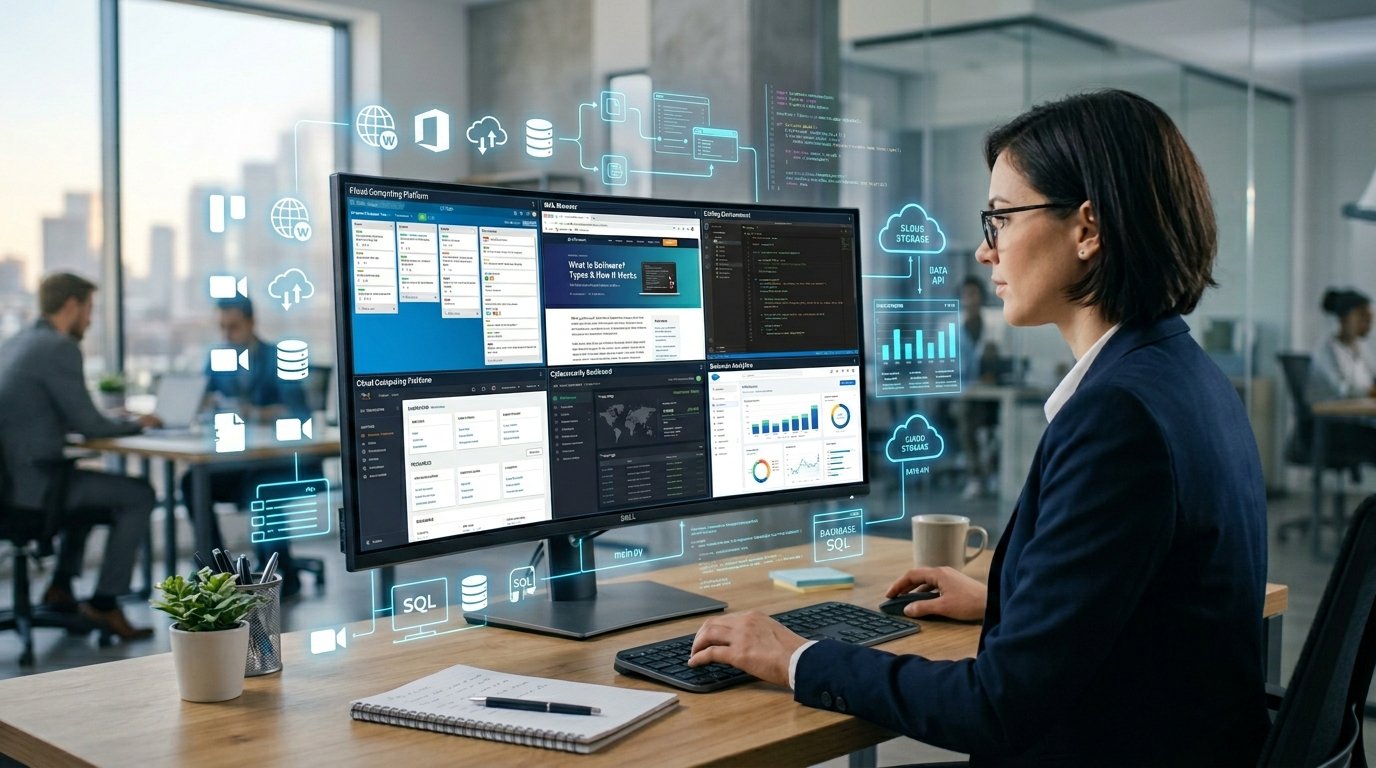
Software is everywhere. It runs on your phone, your laptop, your smart TV, and even your car. But most people have never had it explained simply.
This beginner’s guide answers every common software question in plain English. You will learn what software is, how it works, the different types, real-world examples, and what is changing in 2026 with AI and cloud technology.
No technical background needed. Just clear, practical answers from start to finish.
What Is Software?
Simple Definition of Software
Software is a collection of programs, data, and instructions that tell a computer how to perform specific tasks. It has no physical form. You cannot hold it in your hands. But without it, every computer, smartphone, and tablet would be a useless block of metal and glass.
A simple analogy: if your laptop is a car, the hardware is the engine, wheels, and body. The software is the driver plus all the rules of the road. The hardware does nothing meaningful without the software telling it what to do.
Quick Definition: Software = instructions that make hardware work.
Why Software Is Important
Software makes it possible to do almost everything you do digitally. Sending a message, editing a photo, running a business, attending a video call, streaming a show, filing taxes, managing a school, every one of these actions runs on software.
For businesses, software is not optional. Accounting software handles finances. School management software tracks students and timetables. Health and safety software logs compliance records. Field service software coordinates engineers in the field. Without software, modern organisations could not function.
Real-Life Examples of Software
| Software Name | Category | What It Does |
| Windows 11 / macOS | System software | Runs your computer |
| Microsoft Word | Productivity app | Creates and edits documents |
| Google Chrome | Application software | Browses the internet |
| QuickBooks | Accounting software | Manages business finances |
| Zoom | Communication software | Video meetings and calls |
| Canva | Creative software | Designs graphics and presentations |
| ChatGPT | AI software | Answers questions, writes content |
| Google Classroom | Learning management software | Manages online education |
| Blender | 3D modelling software | Creates 3D graphics and animations |
| Audacity / FL Studio | Music production software | Records and produces music |
How Software Works
Software vs Hardware
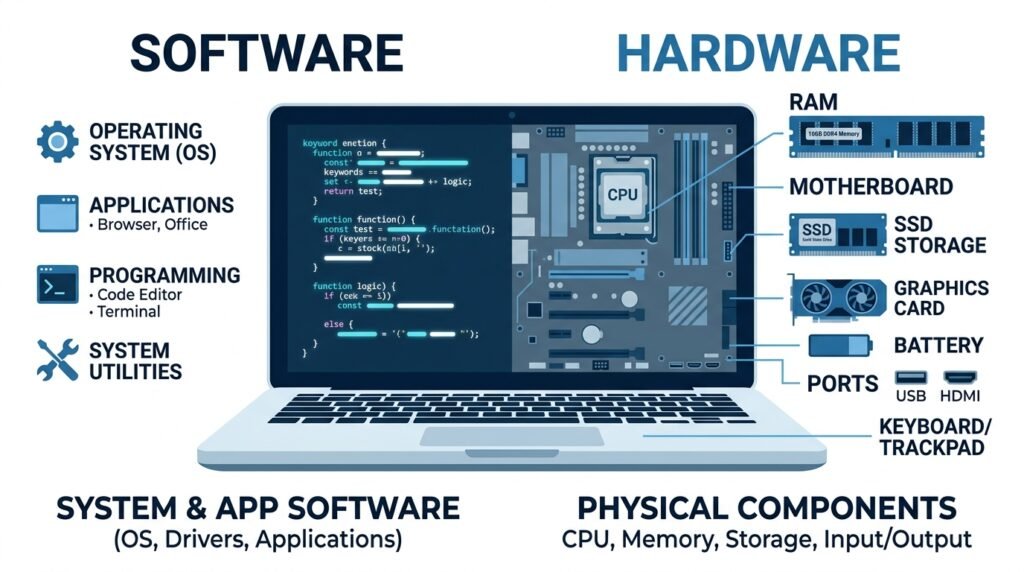
Hardware and software are two halves of every computing device. Neither is useful without the other.
| Hardware | Software | |
| What it is | Physical components | Programs and instructions |
| Can you touch it? | Yes | No |
| Examples | CPU, RAM, hard drive, screen | Windows, Chrome, Word, apps |
| Can it be copied? | No (need to manufacture) | Yes (copy a file instantly) |
| Gets worn out? | Yes, over time | No, but can become outdated |
How Code Becomes Software
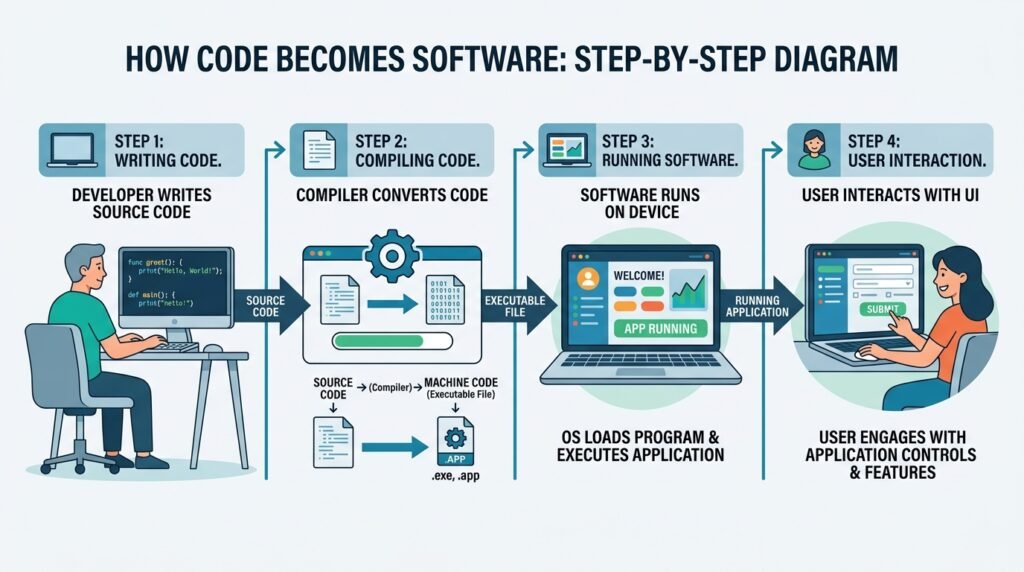
Software starts as code; text written by a developer in a programming language like Python, JavaScript, or C++. Here is the simplified journey from code to the software you use:
1. A developer writes instructions in a programming language.
2. A compiler or interpreter translates that code into machine language the processor understands.
3. The compiled program is tested to catch errors and bugs.
4. The software is packaged and deployed to users as an app, website, or downloadable program.
5. Ongoing updates fix problems and add features over time.
This process is called the software development lifecycle. It applies to everything from a simple mobile app to complex enterprise systems like bank reconciliation software or hospital management platforms.
How Users Interact With Software
Most users interact with software through a graphical user interface, commonly called a GUI. This is the visual layer of buttons, menus, icons, and windows you see on screen. Behind every click and tap, the software is processing instructions and returning a result.
Command-line interfaces, used by developers and IT professionals, allow direct text-based interaction with software without any visual layer. This is faster for certain technical tasks but requires knowledge of specific commands.
Main Types of Software
System Software
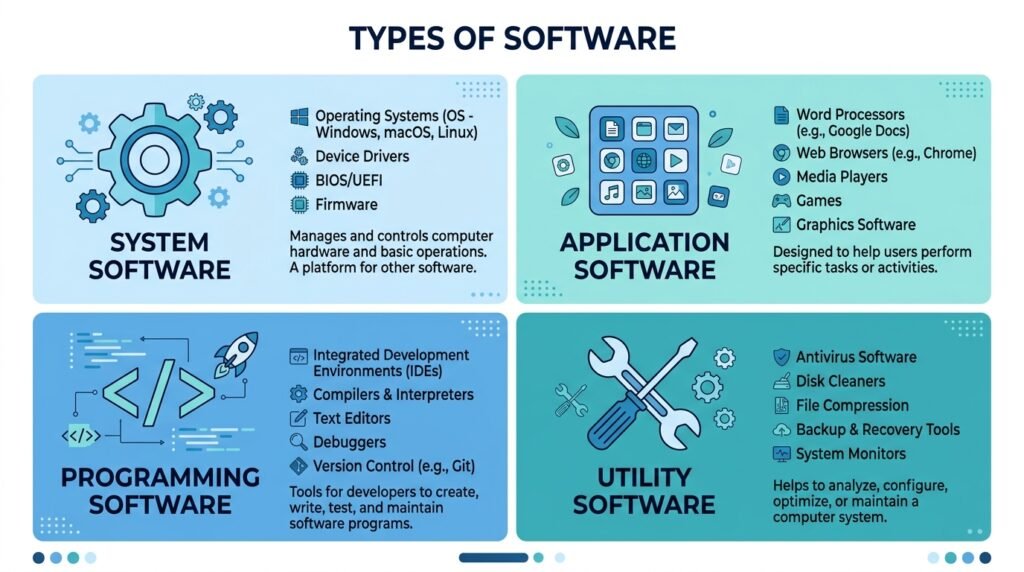
System software is the foundation layer that manages your computer’s hardware and provides a platform for other software to run on. You interact with it every time you turn on a device, even if you never open a single app.
• Operating systems: Windows 11, macOS Sequoia, Linux, Android, iOS
• Device drivers: software that allows your computer to communicate with printers, cameras, and external devices
• Firmware: low-level software embedded in hardware chips
What is computer system software? Computer system software is the collection of programs that manage hardware resources and provide core services for all other software. The operating system is the most important example.
Application Software
Application software, commonly called apps, performs specific tasks for end users. This is the software most people use every day. It runs on top of system software.
• Productivity: Microsoft Office, Google Docs, Notion
• Communication: WhatsApp, Slack, Zoom, Gmail
• Creative: Adobe Photoshop, Canva, Premiere Pro
• Finance: QuickBooks, Xero, cloud accounting software
• Education: Duolingo, Google Classroom, learning management software
• Business: field service software, school management software, compliance software
Programming Software
Programming software is used by developers to create other software. Most users never interact with it directly.
• Code editors and IDEs: VS Code, IntelliJ IDEA, Xcode
• Version control: Git, GitHub
• Compilers and interpreters: tools that translate human-readable code into machine instructions
• App development software: Android Studio, React Native, Flutter
What do software engineers do? Software engineers design, write, test, and maintain the code that powers apps, websites, operating systems, and business tools. They work in every industry from healthcare to finance to entertainment.
Utility Software
Utility software performs maintenance and optimisation tasks that keep your system running smoothly. It works quietly in the background or on demand.
• Antivirus and security tools
• Disk cleaners and file compression tools
• Backup and recovery software
• Screen recording software for capturing your display
• Read and write software for accessibility (text-to-speech, dictation tools)
Examples of Popular Software
Productivity Software
Productivity software helps individuals and teams get work done faster and more organised. These are the most widely used software tools in offices, schools, and homes worldwide.
| Tool | Type | Best For |
| Microsoft Word | Word processor | Documents and reports |
| Google Docs | Cloud word processor | Collaborative writing |
| Notion | All-in-one workspace | Notes, tasks, and wikis |
| Microsoft Excel | Spreadsheet | Data and financial tracking |
| Trello / Asana | Project management | Team task management |
Creative Software
Creative software covers photo editing, video production, graphic design, 3D modelling, and music production.
• Computer software for photo editing: Adobe Photoshop, Lightroom, GIMP (free)
• 3D modelling software: Blender (free), Autodesk Maya, Cinema 4D
• Free music production software: Audacity, GarageBand (Mac), LMMS, Cakewalk
• Video editing: Adobe Premiere Pro, DaVinci Resolve (free version available)
Free music production software for beginners: Audacity is the best free option for recording and basic editing. GarageBand is free on all Apple devices and provides professional-quality production tools. LMMS is the top free choice for Windows users creating beat-based music.
Communication Software
Communication software connects people across devices and distances. This category has expanded massively since remote work became mainstream.
• Video calls: Zoom, Google Meet, Microsoft Teams
• Messaging: Slack, WhatsApp, Discord
• Email clients: Outlook, Gmail, Thunderbird
• Screen recording software for tutorials and presentations: Loom, OBS Studio, Camtasia
Educational Software
Educational software supports learning at every level from primary school to professional certification.
• Learning management software (LMS): Moodle, Canvas, Blackboard, Google Classroom
• Language learning: Duolingo, Babbel, Rosetta Stone
• Read and write software for accessibility: Read&Write by Texthelp, Natural Reader
• School management software: SIMS, Arbor, iSAMS
AI Software Tools
AI software is the fastest-growing category in 2026. These tools use machine learning models to automate tasks, generate content, and assist with complex work.
• ChatGPT (OpenAI): conversational AI, writing, research, coding
• Claude (Anthropic): AI assistant for analysis, writing, and business tasks
• GitHub Copilot: AI coding assistant that suggests code as you type
• Midjourney / DALL-E: AI image generation
• Otter.ai: AI transcription and meeting notes
What Is SaaS (Software as a Service)?
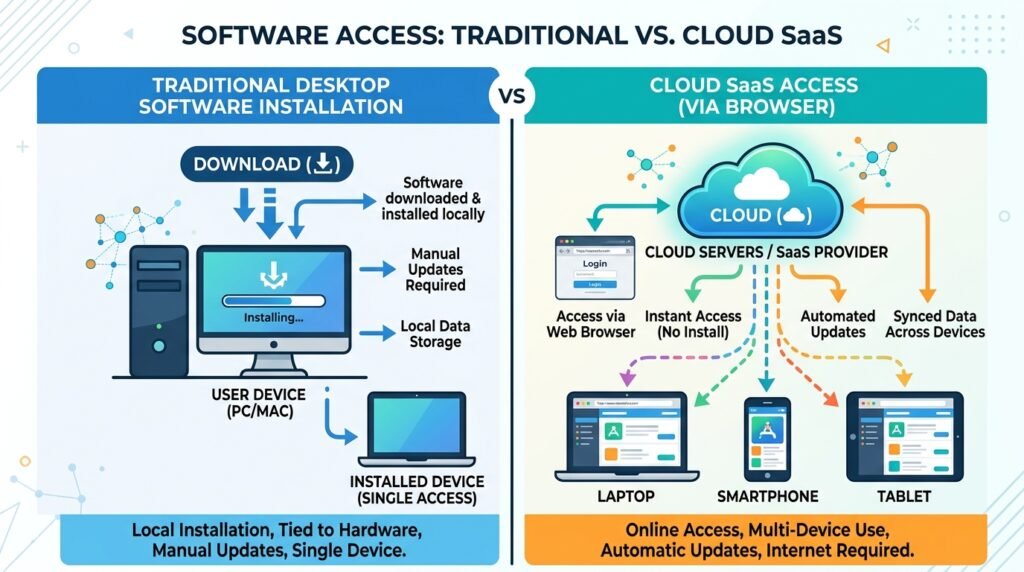
Cloud Software Explained
Cloud software runs on remote servers and is accessed through a web browser or app. You do not download or install it on your device. The software provider handles everything: storage, security, updates, and maintenance.
This is different from traditional software, which you download once, install locally, and manage yourself. Cloud software is always up to date because updates happen automatically on the server side.
SaaS vs Traditional Software
| SaaS (Cloud) | Traditional Software | |
| Where it runs | Provider’s servers | Your computer |
| How you access it | Browser or app | Installed locally |
| Payment model | Monthly or annual subscription | One-time purchase |
| Updates | Automatic | Manual |
| Accessibility | Any device, anywhere | Licensed device only |
| Examples | Google Workspace, Salesforce, Xero | Microsoft Office 2019, Photoshop CS6 |
Examples of SaaS Platforms
• Cloud accounting software: Xero, QuickBooks Online, FreshBooks
• Knowledge base software: Confluence, Notion, HelpScout
• Learning management software: Teachable, Thinkific, Moodle Cloud
• Health and safety software: SafetyCulture, Cority, Intelex
• Field service software: ServiceTitan, Jobber, FieldPulse
• Compliance software: LogicGate, ComplyAdvantage, Diligent
• School management software: Arbor, Bromcom, SIMS Online
What Is AI Software?
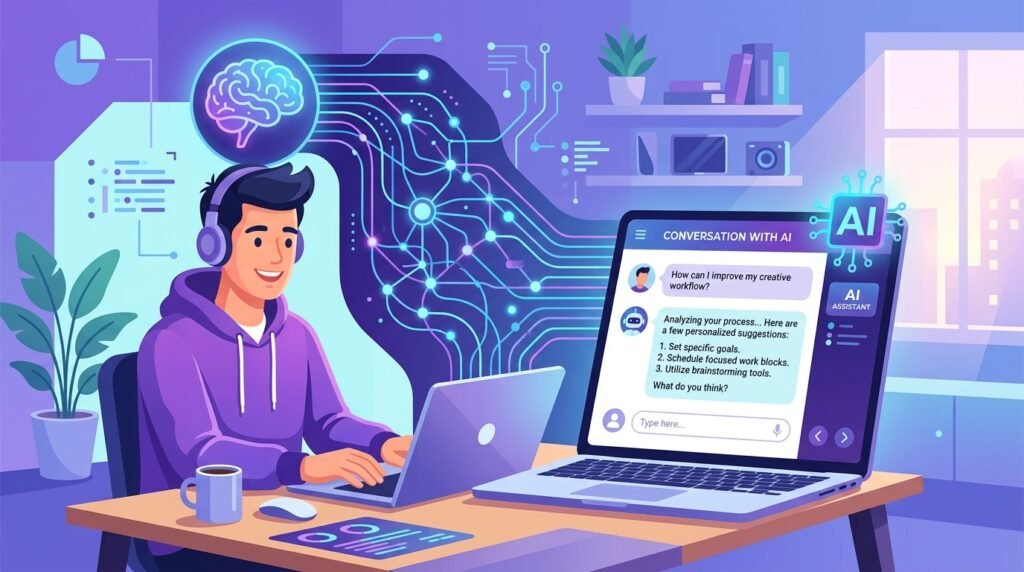
AI software uses machine learning, neural networks, and large language models to perform tasks that previously required human intelligence. In 2026, AI software is embedded in almost every category of application from accounting tools to creative suites to healthcare platforms.
Generative AI Tools
Generative AI software creates new content from text prompts. It can write articles, generate images, compose music, write code, and produce video. The most widely used generative AI tools in 2026 are:
• ChatGPT (OpenAI) for writing, research, and conversation
• Claude (Anthropic) for analysis, long-form content, and business tasks
• Midjourney and Adobe Firefly for AI image generation
• Suno and Udio for AI music generation
• Runway and Pika for AI video generation
AI Productivity Software
AI is being integrated into everyday productivity tools, making them significantly more powerful without requiring users to learn new interfaces.
• Microsoft Copilot inside Word, Excel, and Outlook
• Google Gemini inside Docs, Sheets, and Gmail
• Notion AI for note summarisation and task drafting
• Grammarly AI for writing improvement in real time
• Otter.ai and Fireflies for automated meeting transcription
What software do public health institute employees use? Public health organizations commonly use Microsoft Office Suite, Stata or SPSS for data analysis, REDCap for research data collection, health and safety compliance software, and learning management systems for staff training. Cloud-based case management and reporting platforms are increasingly standard.
AI Coding Assistants
AI coding assistants help software engineers write, debug, and review code faster. They are now standard tools in professional software development.
• GitHub Copilot: autocompletes code as you type inside VS Code and other editors
• Cursor: an AI-native code editor built around GPT-4 and Claude
• Tabnine: AI code completion for teams with privacy-first options
• Amazon CodeWhisperer: free for individual developers, integrates with AWS
Open-Source vs Proprietary Software
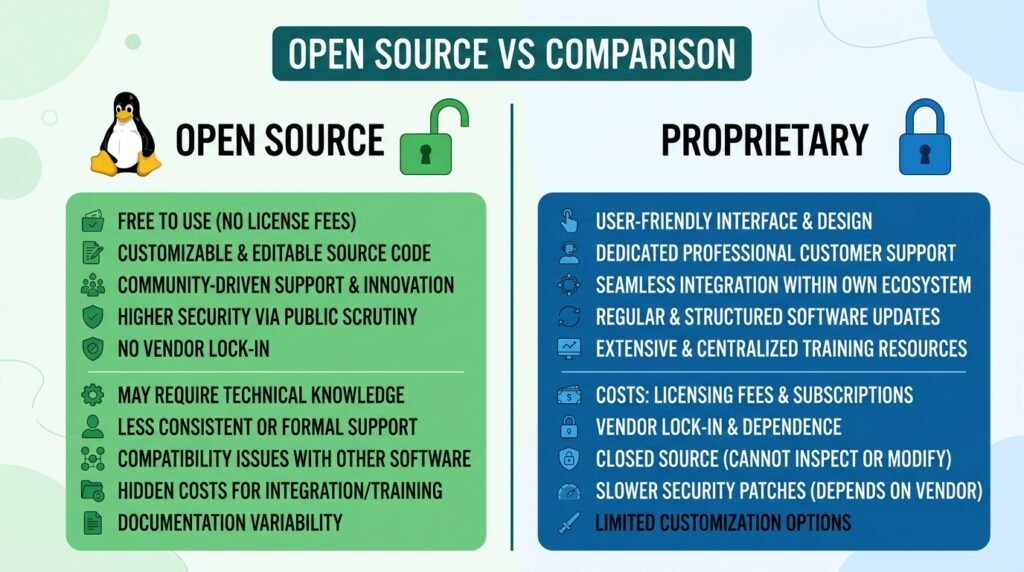
Key Differences
| Open-Source | Proprietary | |
| Source code | Publicly available | Hidden / private |
| Cost | Usually free | Paid licence or subscription |
| Customization | Full access to modify | Limited or none |
| Support | Community forums | Official vendor support |
| Examples | Linux, Firefox, Blender, GIMP | Windows, Adobe CC, Salesforce |
Pros and Cons
Open-source software pros: free to use, transparent code, large community, highly customisable, no vendor lock-in. Cons: may require technical knowledge, inconsistent documentation, no guaranteed professional support.
Proprietary software pros: polished user experience, professional support, regular feature updates, accountability from the vendor. Cons: subscription costs, no ability to inspect or modify code, dependent on the vendor staying in business.
Real Examples
• Open-source: Linux (operating system), Firefox (browser), Blender (3D modelling), GIMP (photo editing), Audacity (music production), Moodle (learning management software)
• Proprietary: Windows, macOS, Adobe Photoshop, Microsoft Office, Salesforce, QuickBooks
• Hybrid (free tier + paid): Notion, Slack, Zoom, Canva, VS Code
Bespoke software development: Bespoke or custom software solutions are software built specifically for one organisation rather than sold to the general public. Custom software solutions are developed by software engineering companies and tailored to exact business requirements. They are more expensive upfront but can provide a significant competitive advantage.
Benefits of Software
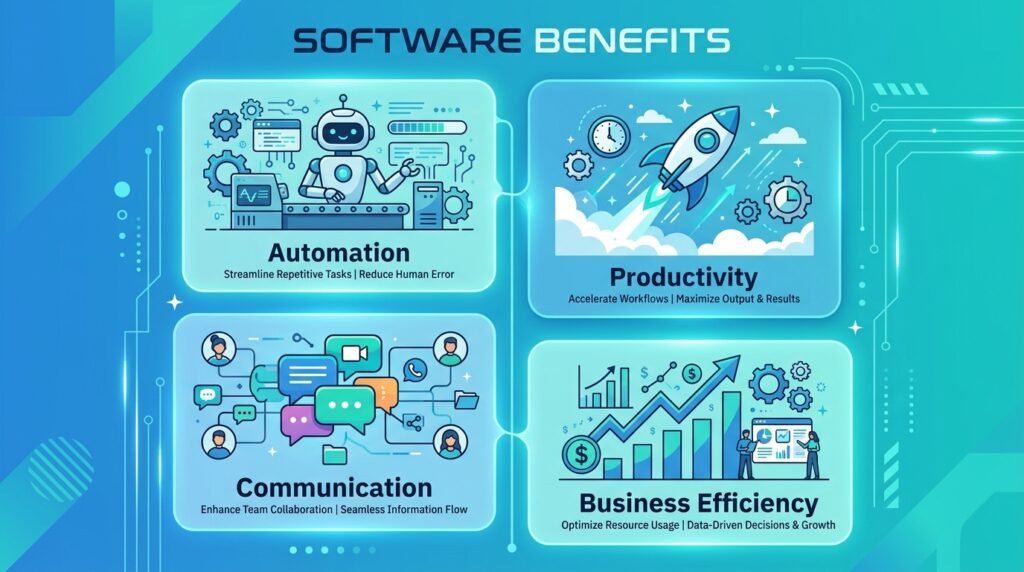
Automation
Software automates repetitive tasks that would otherwise require hours of manual work. Bank reconciliation software matches thousands of transactions automatically in seconds. Payroll software calculates wages, deductions, and tax contributions without manual entry. Email marketing platforms send personalised messages to thousands of customers on a schedule.
What is software automation? Software automation is the use of programs to execute tasks that would otherwise require human action. It reduces errors, increases speed, and frees people to focus on higher-value work.
Productivity
Software makes individuals and teams dramatically more productive. Word processors eliminated retyping. Cloud document tools eliminated emailing file versions back and forth. Project management software replaced spreadsheet trackers. In every case, software reduced friction and increased output.
Communication
Software has fundamentally changed how people communicate. Email replaced post for most business correspondence. Video conferencing replaced most business travel for meetings. Instant messaging apps replaced phone calls for quick questions. All of this is software.
Business Efficiency
For businesses of every size, purpose-built software reduces operational costs and improves decision-making. Field service management software reduces scheduling errors and increases the number of jobs completed per day. Compliance software ensures legal requirements are tracked and documented without manual effort. Accounting software reviews and flags errors that human bookkeepers might miss.
Common Software Problems
Bugs
A bug is an error in a program’s code that causes unintended behaviour. Bugs range from minor visual glitches to critical failures that crash entire systems. All complex software has bugs. The difference between good and poor software is how quickly bugs are identified and fixed.
Malware
Malware is malicious software designed to damage, disrupt, or gain unauthorized access to systems. It includes viruses, ransomware, spyware, and trojans. Malware typically enters a system through email attachments, unsafe downloads, or unpatched security vulnerabilities.
Protection: Keep your operating system and all software updated. Use reputable antivirus software. Avoid downloading programs from unofficial sources.
Security Vulnerabilities
A security vulnerability is a weakness in software code that attackers can exploit. Even reputable, widely-used software contains vulnerabilities. Software developers release security patches to fix them. This is the reason keeping software updated is one of the most important security practices.
Compatibility Issues
Software compatibility issues occur when a program is designed for one operating system, device, or software version and does not work correctly on another. A common example is software built for Windows that does not run on macOS, or an older app that breaks after an operating system update.
How to do a software reset on iPhone: Go to Settings, then General, then Transfer or Reset iPhone, then Reset. You can choose to reset all settings (which keeps your data) or erase all content and settings (a full factory reset). Always back up your device to iCloud or a computer before performing a full reset.
How Software Is Developed
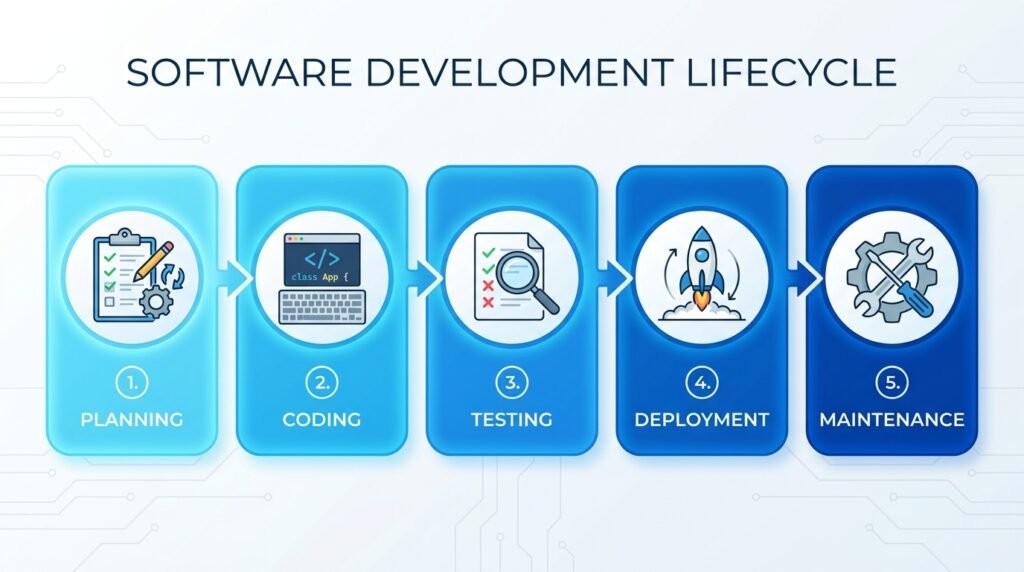
Building software follows a structured process called the Software Development Lifecycle (SDLC). Whether it is a mobile app, a bespoke software development project for a business, or a large enterprise platform, the same core stages apply.
Planning
In the planning stage, teams define what the software needs to do, who will use it, and what success looks like. Requirements are gathered from stakeholders. For custom software solutions, this stage involves detailed workshops with the client to understand business processes and goals.
Coding
Developers write the code that powers the software using programming languages suited to the project. Web applications typically use JavaScript, Python, or PHP. Mobile apps use Swift (iOS) or Kotlin (Android). Enterprise systems often use Java or C#.
What is software modelling? Software modelling is the process of creating abstract representations of a software system before writing code. Models show how components interact, what data flows where, and how users move through the system. Common tools include UML diagrams and flowcharts.
Testing
Testing ensures the software works as intended and catches bugs before they reach users. Types of testing include unit testing (individual components), integration testing (components working together), user acceptance testing (real users trying the software), and security testing (looking for vulnerabilities).
Deployment
Deployment is the process of making the software available to users. For web applications, this means publishing it to a server. For mobile apps, it means submitting to the App Store or Google Play. For enterprise software, it may mean installing on company servers or migrating to a cloud platform.
Updates and Maintenance
After release, software requires ongoing updates to fix bugs, patch security vulnerabilities, add new features, and maintain compatibility with updated operating systems and devices. SaaS platforms update continuously. Traditional installed software releases periodic version updates.
Specialist Software Categories Explained
Field Service Management Software
Field service management software helps businesses that send workers to customer locations. It is widely used by plumbing companies, HVAC engineers, telecommunications engineers, gas software engineers, and property maintenance teams.
• Job scheduling and dispatch: assign the right engineer to the right job
• Real-time GPS tracking of field workers
• Digital job sheets replacing paper forms
• Mobile apps for engineers to update job status on-site
• Automated customer notifications and appointment reminders
• Invoicing and payment collection in the field
Leading field service software platforms include ServiceTitan, Jobber, Simpro, and FieldPulse. Cloud-based versions allow managers to oversee field operations from anywhere.
Accounting Software
Accounting software automates financial record-keeping, invoicing, expense tracking, and tax reporting. Cloud accounting software has replaced desktop accounting tools for most small and medium businesses.
| Tool | Best For | Pricing Model |
| QuickBooks Online | Small businesses | SaaS subscription |
| Xero | Growing businesses | SaaS subscription |
| FreshBooks | Freelancers | SaaS subscription |
| Sage 50 | Mid-size businesses | Desktop + cloud hybrid |
| Wave Accounting | Sole traders | Free (paid add-ons) |
Accounting software reviews consistently highlight automation as the top benefit: automatic bank feeds, AI-powered receipt scanning, and automated bank reconciliation software that matches transactions without manual input.
Compliance and Health and Safety Software
Compliance software helps organisations manage regulatory requirements, audit trails, and policy documentation. Health and safety software specifically manages risk assessments, incident reporting, inspection checklists, and safety training records.
• Digital risk assessment creation and storage
• Automated compliance deadline reminders
• Incident and near-miss logging with photo evidence
• Staff safety training tracking and certification management
• Regulatory reporting and audit-ready documentation
Leading platforms include SafetyCulture (iAuditor), Cority, Intelex, and Evotix. Most now offer mobile apps so safety checks can be completed on-site.
Knowledge Base Software
Knowledge base software stores, organises, and makes searchable information that an organisation wants to share internally or publicly. It is used for customer support documentation, internal wikis, employee onboarding guides, and product manuals.
• Confluence: team wikis and internal knowledge management
• Notion: flexible workspace combining notes, databases, and docs
• HelpScout Docs: customer-facing help centres
• Zendesk Guide: support knowledge base integrated with ticketing
Screen Recording Software
Screen recording software captures your computer display as a video. It is used for creating tutorials, software demos, bug reports, and online course content.
• Loom: quick async video messages and walkthroughs
• OBS Studio: free, professional-grade recording and streaming
• Camtasia: editing and recording combined, popular for courses
• Snagit: screenshots and short recordings with annotation tools
Future of Software in 2026 and Beyond
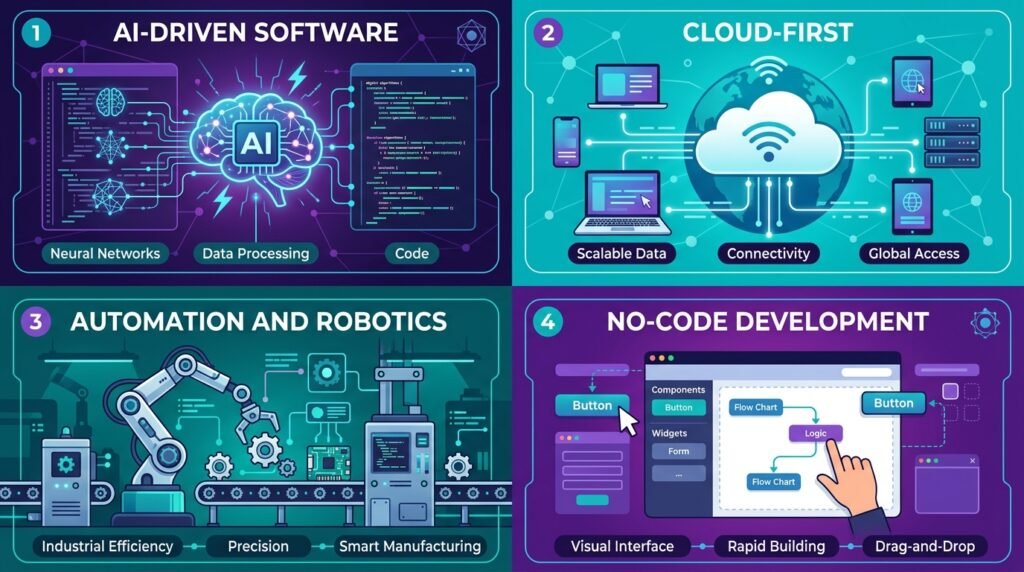
AI-Driven Software
In 2026, AI will not be a standalone category. It is a feature inside almost every software product. Word processors suggest better sentences. Accounting software flags unusual transactions. CRM systems predict which leads are most likely to convert. Project management tools identify schedule risks automatically.
The next phase is AI agents: software that does not just assist users but executes multi-step tasks independently. Early versions are already in tools like Microsoft Copilot and Claude. Over the next five years, autonomous AI agents will become standard components of enterprise software.
Cloud-First Applications
The majority of new software in 2026 is designed for the cloud first, with local installation as an optional fallback. This means automatic updates, access from any device, real-time collaboration, and centralised data. For businesses, this reduces IT infrastructure costs and complexity.
Automation and Robotics
Software automation is expanding beyond business processes into physical environments. Robotics software, autonomous vehicle software, and industrial control systems are growing rapidly. Even garden and home robotics are now running sophisticated software platforms.
No-Code and Low-Code Platforms
No-code and low-code platforms allow people without programming knowledge to build apps, automate workflows, and create internal tools using drag-and-drop interfaces. Platforms like Bubble, Webflow, and Microsoft Power Apps are making app development software accessible to non-developers.
This trend is significant for small businesses and schools. A school administrator can build a custom attendance tracker. A small business owner can create an order management system. No software engineering degree required.
Frequently Asked Questions
What is software in simple terms?
Software is a set of instructions that tells a computer, phone, or tablet what to do. Without software, hardware cannot perform any task. Examples include your phone’s operating system, apps like WhatsApp, and business tools like accounting or project management platforms.
What are the different types of software?
The four main types are system software (like Windows or Android that runs the device), application software (like Word or Zoom that you use for tasks), programming software (tools developers use to build other software), and utility software (tools that maintain and protect your system, like antivirus programs).
What is the difference between hardware and software?
Hardware is the physical parts of a computer: screen, keyboard, processor, and memory. Software is the invisible code that runs on that hardware. Hardware is the body; software is the brain. You need both for any computing device to work.
What are examples of software?
Common software examples include: Microsoft Word (word processor), Google Chrome (browser), Zoom (video calls), QuickBooks (accounting), Adobe Photoshop (photo editing), Blender (3D modelling), FL Studio (music production), and ChatGPT (AI assistant).
What is SaaS software?
SaaS stands for Software as a Service. It is software you access through a browser or app rather than downloading to your device. You pay a monthly or annual subscription. Examples include Xero, Salesforce, Zoom, Google Workspace, and Slack. The provider handles all updates and maintenance.
How does software work?
Software works by translating human-readable code into instructions a processor can execute. A developer writes code, a compiler converts it to machine language, the software is tested and packaged, then deployed to users. When you click a button in an app, the software processes that input and returns an output almost instantly.
What is AI software?
AI software uses machine learning and large language models to perform tasks that normally require human intelligence: writing, answering questions, analysing data, generating images, and writing code. In 2026, AI features are built into most major software categories including productivity tools, creative suites, and business platforms.
Why is software important?
Software is important because almost every modern activity depends on it. Communication, education, healthcare, finance, entertainment, and business operations all run on software. Without it, the devices we rely on every day would be unable to perform any useful function.
What is open-source software?
Open-source software is software whose source code is publicly available for anyone to view, use, and modify. It is usually free. Examples include Linux, Firefox, Blender, and GIMP. The opposite is proprietary software, where the code is private and owned by a company, like Windows or Adobe Photoshop.
How is software developed?
Software is developed through a five-stage process: planning (defining requirements), coding (writing the program), testing (finding and fixing bugs), deployment (releasing to users), and maintenance (ongoing updates and improvements). This process is called the Software Development Lifecycle and applies to everything from mobile apps to complex enterprise systems.
Final Thoughts: Software Is the Foundation of the Modern World
Software is not just a technology category. It is the infrastructure of modern life. Every business process, every digital communication, every automated system, every creative tool runs on software.
Understanding the basics of software, knowing the difference between types, recognizing when SaaS is better than installed software, and staying informed about AI developments gives you a genuine advantage, whether you are a student, a business owner, or simply someone who wants to make smarter technology choices.
If you found this guide useful, bookmark it and share it with anyone who is starting their technology journey. Explore the related guides below to go deeper into specific topics.