
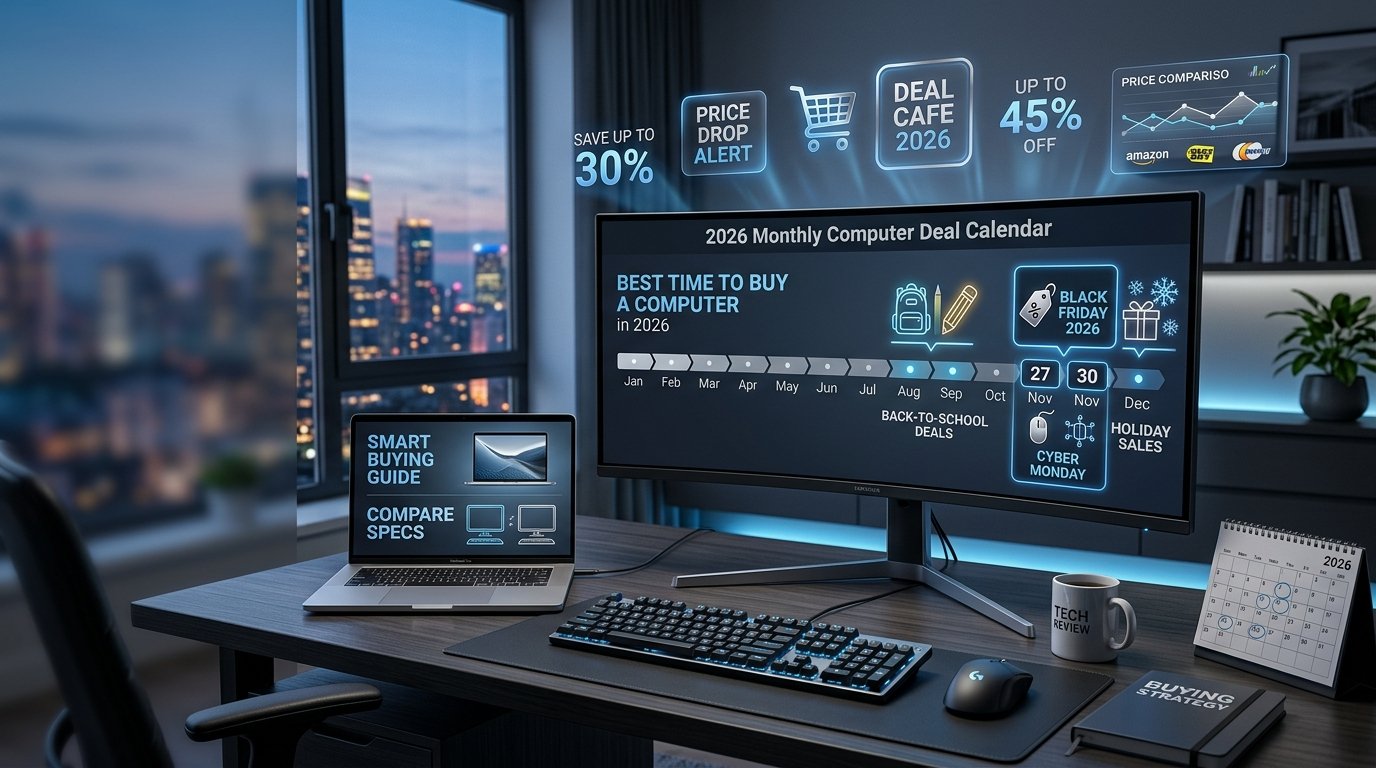
Buying a computer is one of the biggest tech investments you’ll make whether it’s a sleek laptop for school, a powerful Dell workstation for your office, or a custom gaming PC built to handle the latest titles. But here’s the thing: when you buy matters almost as much as what you buy.
Miss the right window and you could overpay by hundreds of dollars. Nail the timing, and you might land a premium machine at a budget price.
This guide gives you a complete 2026 deal calendar, brand-by-brand breakdown, gaming PC guidance, cloud computing and AI PC trends, security tips, and all the tools you need to track prices like a pro.
Is Now a Good Time to Buy a Computer?
Before scanning deals, ask yourself a simple question: do you need a computer right now, or can you wait a few weeks or months for better pricing?
Signs You Should Buy Now
• Your current computer is broken or failing and affecting your work or school.
• You have found a confirmed sale price that is 20% or more below the regular retail price.
• A new school semester, work deadline, or project is starting within 30 days.
• Stock is limited on a model you have been researching for weeks.
• You are buying a Dell, HP, or Lenovo and a back-to-school or Prime Day event is live right now.
Signs You Should Wait
• A major product announcement (Apple WWDC, Intel/AMD launch, CES) is within 6 weeks.
• October or early November, Black Friday deals are just around the corner.
• Your current computer is functional, just slow. A few tweaks may help. [See: How to Speed Up a Laptop Computer]
• You are eyeing a brand-new model that launched in the last 30 days, prices almost always drop after launch buzz fades.
• You are a student and back-to-school season (July to September) has not started yet.
Pro Tip: If you are within 4 weeks of a major sale event and your computer still works, wait. Patience is the most underrated money-saving strategy.
Best Months to Buy a Computer: The 2026 Deal Calendar
Not all sale seasons are equal. Here is a month-by-month breakdown of when prices actually drop and why, plus a visual calendar table for quick reference.
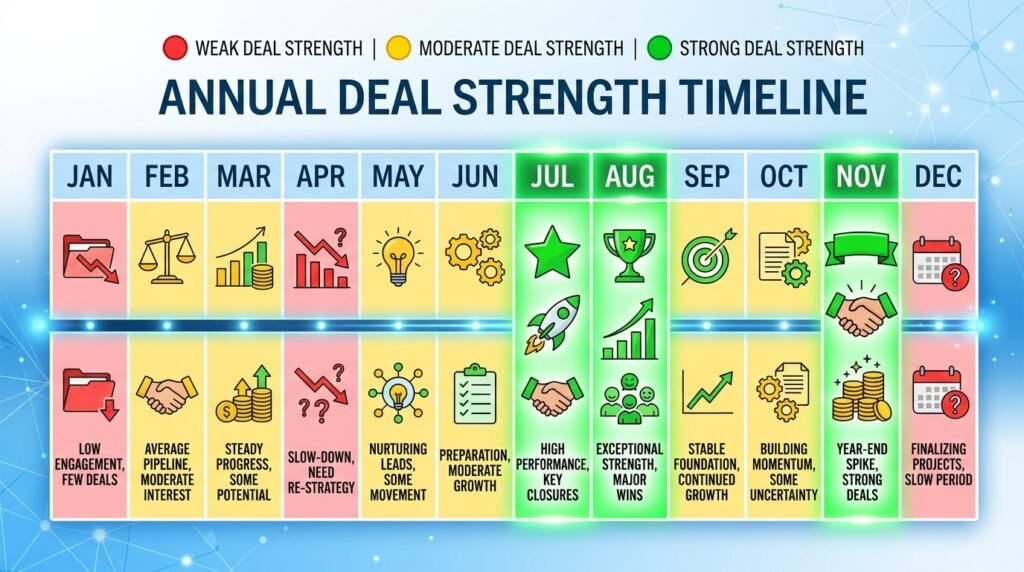
| Month | Sale Event | Best For | Discount Range |
| January | New Year Clearance | Previous year models | 10–25% |
| February | Presidents Day | Laptops & Desktops | 10–15% |
| March | Spring Sales | New model season | 5–15% |
| May | Memorial Day | All categories | 10–20% |
| July | Amazon Prime Day | Amazon brands + partners | 20–40% |
| August | Back-to-School | Student laptops | 15–30% |
| September | Labor Day | Premium brands | 10–20% |
| November | Black Friday | Everything | 20–50% |
| December | Cyber Monday + Holiday | Clearance deals | 15–45% |
January: New Year Clearance
Retailers need to clear out last year’s inventory after the holiday rush. This makes January one of the most underrated months to buy a computer. You will find genuine discounts on models from the previous year and for most users, a 2024 or 2025 model is still more than capable.
Best for: Budget shoppers, students starting spring semester, anyone buying their first computer.
March: Spring Sales
March marks the beginning of spring sale cycles. Many brands, including Dell and HP, roll out promotional pricing to capture buyers who missed the winter holidays. It is also when new models start arriving, pushing older inventory to clearance prices.
Best for: Buyers who want the previous generation at a steep discount.
July: Amazon Prime Day
Prime Day has grown into one of the biggest shopping events of the year. In 2025, Prime Day generated record-breaking laptop and desktop sales across Amazon, with discounts of up to 40% on select models. For 2026, expect similar or larger discounts on Amazon-brand devices (Fire, Echo accessories), plus major deals from Dell, HP, Lenovo, Samsung, and Microsoft.
Best for: Anyone comfortable buying online, especially Amazon Prime members.
August: Back-to-School Deals
August is the golden month for student buyers. Apple, Dell, HP, and Lenovo all run aggressive back-to-school promotions targeting high school and college students. Many come with bonus offers: free AirPods with a MacBook, free gaming accessories with a Lenovo gaming laptop, or extended warranties with Dell.
Best for: Students, parents buying for kids, first-time laptop buyers.
November: Black Friday
Black Friday remains the single biggest computer sale event of the year. Discounts regularly hit 30 to 50% on popular models. The best deals tend to sell out fast, have your shortlist ready before November 1st.
Best for: Everyone. If you can wait until November, do.
December: Cyber Monday and Holiday Clearance
Cyber Monday (the Monday after Thanksgiving) often rivals Black Friday for laptop deals. Additionally, December sees post-holiday clearance as retailers need to move remaining stock before year-end inventory counts.
Best for: Anyone who missed Black Friday or wants deals on accessories and peripherals.
Best Holiday Sales for Computer Deals
Beyond the monthly calendar, specific holiday sale events consistently produce some of the best computer pricing of the year.
Black Friday (Late November)
The undisputed champion of computer deals. Major retailers including Best Buy, Amazon, Walmart, and Dell’s own website all compete for your business. You will see genuine discounts not just inflated original prices on laptops, desktops, and accessories.
Black Friday, held the Friday after Thanksgiving, typically offers the deepest computer discounts of the year, with savings of 20 to 50% on laptops and desktops from major brands.
Cyber Monday (Late November)
Originally an online-only counterpart to Black Friday, Cyber Monday now stretches across an entire week. Online-only retailers and brands like Dell, Lenovo, and HP often save their best web deals for Cyber Monday.
Labor Day (Early September)
Labor Day sales bridge the back-to-school season and the fall semester. Retailers offer deals on laptops, monitors, and desktops, often including refurbished and open-box items at significant discounts.
Memorial Day (Late May)
Memorial Day is a mid-tier sale event but still worth watching, especially for desktop computers, gaming rigs, and monitors. Dell and HP are particularly active during Memorial Day promotions.
Presidents Day (Mid-February)
An underrated sale event. Presidents Day falls in a slow retail period, which means genuine discounts to drive traffic. Good for laptops, Chromebooks, and refurbished computers.
Best Time to Buy Specific Computer Brands
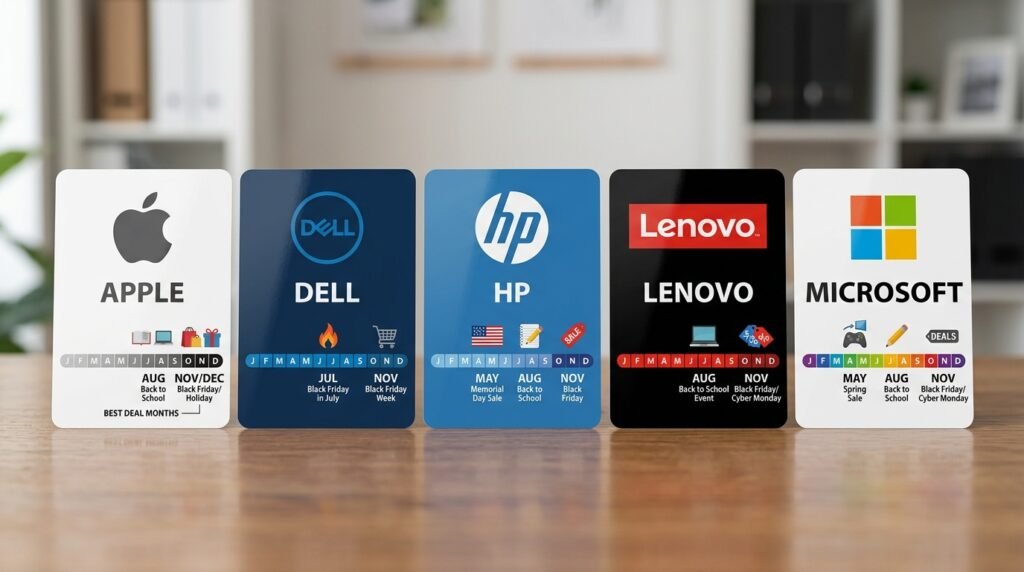
Different brands follow different release and sale cycles. Here is when to watch for deals on the biggest names.
| Brand | Best Sale Period | Key Event | Tip |
| Apple MacBook | June / November | WWDC, Black Friday | Buy refurb for up to 15% off |
| Dell | July / November | Prime Day, Black Friday | Check Dell Outlet Store |
| HP | August / November | Back-to-School, BF | HP Academy Discount for students |
| Lenovo | January / November | Clearance, Black Friday | Lenovo.com often best price |
| Microsoft Surface | October / November | New model launch, BF | Older Surface models drop fast |
Apple MacBooks
Apple does not participate in traditional sale events like Black Friday with deep discounts. Instead, the best times to buy a MacBook are:
• June/July: After Apple’s WWDC announcement, older MacBook models drop in price.
• November: Certified resellers like Best Buy and Amazon offer $100 to $250 off during Black Friday.
• Year-round: Apple’s own Refurbished Store (apple.com/shop/refurbished) sells certified refurbished MacBooks at 10 to 15% off, with full Apple warranties.
Avoid buying a new MacBook immediately after launch, prices are at their peak and stock is limited.
MacBooks rarely go on deep sale. The best discounts appear in November at certified resellers, or year-round on the Apple Refurbished Store at 10 to 15% below retail.
Dell Computers
Dell is one of the most deal-friendly computer brands. Dell runs frequent promotions on Dell.com, and their Dell Outlet store sells certified refurbished business laptops and desktops at steep discounts. Key best Dell Laptops 2026 buying windows:
• Prime Day (July): Dell regularly participates with up to 35% off select XPS, Inspiron, and gaming laptops.
• Back-to-School (August): Students deal with free accessories or software.
• Black Friday (November): Some of the deepest discounts of the year, especially on business-grade laptops.
HP Laptops
HP follows a similar sales cycle to Dell. The HP Academy program offers ongoing discounts for students and educators. Best buying windows for HP:
• Back-to-school (August) for student pricing.
• Black Friday for the deepest general discounts.
• HP.com flash sales, which occur throughout the year with no advance notice, sign up for HP email alerts.
Lenovo Laptops
Lenovo is known for aggressive online pricing. Their own website (lenovo.com) often offers lower prices than third-party retailers. Lenovo ThinkPads, popular for business and cloud computing workloads, see strong discounts during:
• January clearance (post-holiday).
• Black Friday and Cyber Monday (deepest discounts).
• Lenovo’s own ‘Doorbuster’ and flash sale events, announced via their email list.
Microsoft Surface Devices
Microsoft Surface devices (Surface Pro, Surface Laptop, Surface Studio) follow Microsoft’s October hardware event cycle. New models typically launch in October, which means previous-generation Surface devices drop in price sharply from October onward. Best buying windows:
• October/November: Previous-gen Surface devices at 20 to 30% off after new model launch.
• Black Friday: Certified Microsoft Store discounts.
• Microsoft Education Store: Ongoing discounts for students and teachers.
Best Time to Buy a Gaming PC
Gaming PCs have their own buying cycles driven by GPU (graphics card) releases from NVIDIA and AMD, which are the most expensive components in any gaming build.
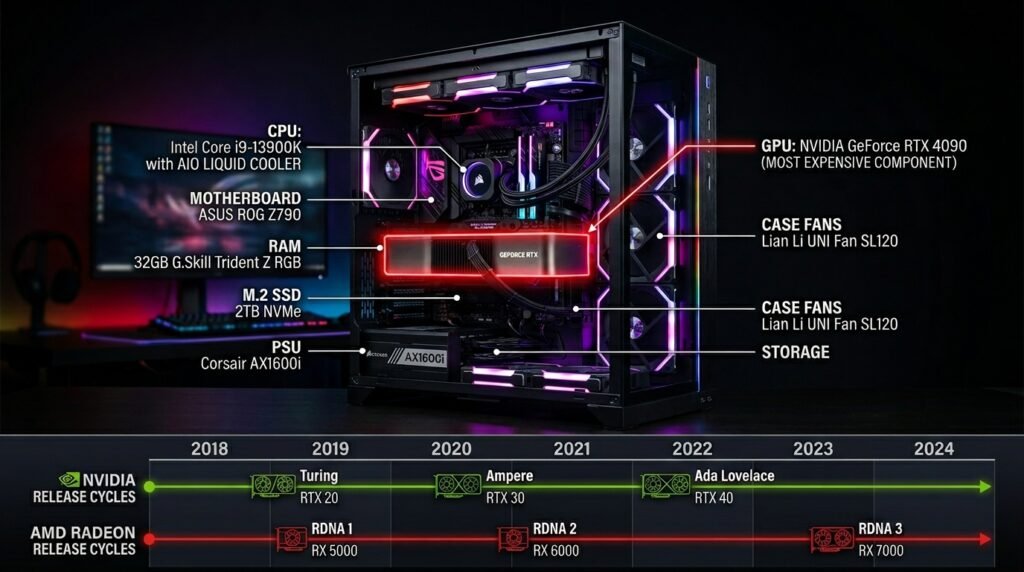
NVIDIA GPU Release Cycles
NVIDIA typically releases new GPU generations every 18 to 24 months. In 2026, NVIDIA’s latest architecture is already in the market. This means:
• If a new NVIDIA GPU generation just launched, wait 2 to 3 months. Prices on both new and previous-gen cards stabilize after launch hype.
• If a launch is rumored within 6 months, current GPU prices may drop preemptively.
• Black Friday remains the best time to buy a prebuilt gaming PC with an NVIDIA GPU.
AMD GPU and CPU Releases
AMD releases new Ryzen CPUs and Radeon GPUs on a similar 18 to 24 month cadence. AMD CPUs in particular offer excellent price-to-performance for both gaming and cloud computing tasks. Watch for:
• New Ryzen CPU launches (typically autumn): Previous-gen Ryzen chips drop 15 to 25%.
• AMD Radeon GPU releases: Competitors (NVIDIA) often cut prices in response.
Prebuilt vs. Custom Gaming PC: When to Buy
Prebuilt gaming PCs from brands like ASUS ROG, Dell Alienware, HP OMEN, and Lenovo Legion are easiest to buy during Black Friday and Prime Day, deals can hit 20 to 30% off. Custom builds (buying parts separately) offer more flexibility but require monitoring individual component prices.
The best time to buy a gaming PC is during Black Friday for prebuilt systems, or in the months following a new NVIDIA or AMD GPU launch, when previous-generation cards drop in price significantly.
AI PCs in 2026: A New Buying Consideration
One of the biggest shifts in 2026 is the rise of AI PCs, computers with dedicated NPU (Neural Processing Unit) chips from Intel, AMD, and Apple that accelerate AI tasks locally, without needing cloud computing resources.
If you plan to use AI tools like local language models, image generation, or AI-assisted productivity apps, an AI PC may be worth the investment. Key things to know:
• Intel Core Ultra (Meteor Lake / Arrow Lake) chips and AMD Ryzen AI series include built-in NPUs.
• Apple’s M-series chips (M3, M4) have included Neural Engines since 2020 and remain leaders in on-device AI performance.
• AI PC models launched in 2025 are now seeing their first major discounts in 2026, a good buying window.
• For most general users (email, browsing, documents), a standard laptop is still sufficient. AI PC features only benefit users running specific AI workloads.
Should You Buy a Refurbished Computer?
Refurbished computers are one of the most overlooked ways to save money, if you buy from the right sources. Here is what you need to know.
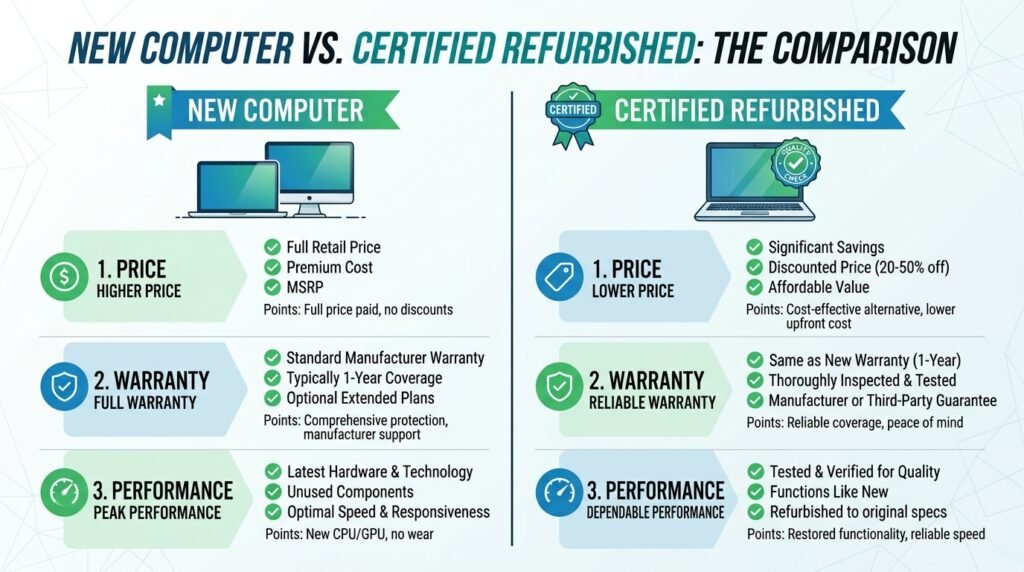
Apple Refurbished Store
Apple’s Certified Refurbished program is one of the most trusted in the industry. Every refurbished MacBook, iMac, or iPad goes through a full diagnostic, repair, and repackaging process. They come with a one-year warranty identical to a new device and are eligible for AppleCare+. You can typically save 10 to 15% versus the new retail price.
Where to buy: apple.com/shop/refurbished
Amazon Renewed
Amazon Renewed offers refurbished computers from third-party sellers certified by Amazon. Quality ranges from ‘like new’ to ‘good.’ Ensure you are buying items with the Amazon Renewed Guarantee, which provides a replacement or refund if the product does not work as expected.
Best for: Budget buyers willing to do a bit more research on seller ratings.
Best Buy Open-Box
Best Buy Open-Box items are typically products returned by customers, often unopened or barely used. Best Buy grades them (Excellent, Satisfactory, Fair) and discounts them 10 to 30%. You can inspect them in-store before buying, which is a significant advantage.
Best for: Buyers who want to see the product in person before purchasing a discounted unit.
Refurbished computers from certified sources; like the Apple Refurbished Store, Amazon Renewed, or Best Buy Open-Box are worth buying. They are tested, often warrantied, and typically cost 10 to 30% less than new models.
Best Tools to Track Computer Prices
Do not guess at whether a deal is real. These tools let you verify pricing history so you know if you are actually getting a discount.
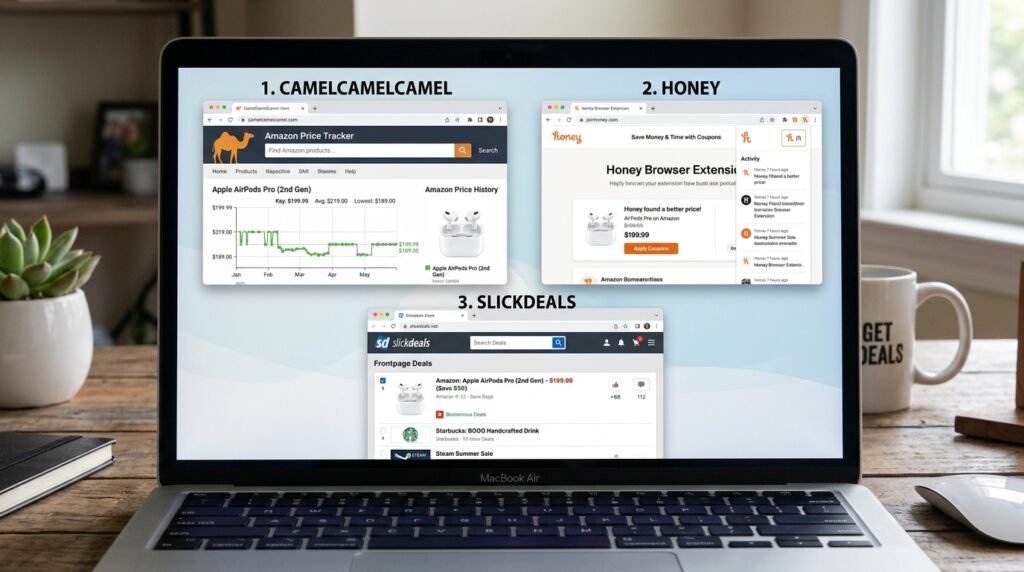
CamelCamelCamel
CamelCamelCamel tracks the price history of any product on Amazon. Simply paste an Amazon product URL into the site to see a full price history chart revealing whether the ‘sale price’ is genuine or a manufactured discount. You can also set price drop alerts via email.
Website: camelcamelcamel.com
Honey (PayPal)
Honey is a browser extension that automatically tests coupon codes at checkout and notifies you of price drops across thousands of retailers including Dell, HP, Best Buy, and Walmart. Honey’s ‘Price History‘ feature, similar to CamelCamelCamel, shows whether today’s price is actually a deal.
Available as a free browser extension for Chrome, Firefox, and Edge.
Slickdeals
Slickdeals is a community-driven deal platform where users post and vote on the best deals they find. Computer deals on Slickdeals are often verified and include community commentary on whether the discount is genuine. The Slickdeals app also sends real-time deal alerts.
Website: slickdeals.net
Computer Security: Protecting Your Investment
Buying a new computer is only part of the equation. Keeping it secure from viruses, malware, and unauthorized access is just as important, especially if you use it for banking, work, or storing personal files.

How Can You Protect Your Home Computer?
Protecting your home computer does not require technical expertise. Follow these foundational steps:
1. Install reputable antivirus software (Windows Defender is built into Windows 10 and 11 and is sufficient for most users).
2. Enable your firewall (on by default in Windows and macOS).
3. Keep your operating system and apps updated. Most attacks exploit unpatched vulnerabilities.
4. Use a strong, unique password for your computer login and enable two-factor authentication where available.
5. Avoid downloading software from unknown sources. Stick to the Microsoft Store, Mac App Store, or official vendor websites.
6. Use a VPN when on public Wi-Fi networks.
7. Back up your data regularly to an external drive or cloud storage.
To protect your home computer: install antivirus software, keep your OS updated, use strong passwords, enable your firewall, and back up your data regularly to an external drive or cloud service.
How to Check If Your Computer Has a Virus
Signs your computer may be infected:
• Sudden slowdown in performance with no clear reason.
• Unusual pop-up messages or browser redirects.
• Programs opening or closing on their own.
• High CPU or memory usage when the computer should be idle.
To check: Open your antivirus software and run a full system scan. On Windows, press Windows + I, go to Windows Security, and run a Quick Scan or Full Scan. On Mac, check for unusual login items in System Preferences > Users & Groups.
What Are Computer Viruses?
Computer viruses are malicious software programs designed to replicate themselves and spread between computers, often causing damage to files, stealing personal information, or disrupting normal computer operation. Modern threats include ransomware (which encrypts your files and demands payment), spyware (which silently monitors your activity), and trojans (malware disguised as legitimate software).
How to Speed Up a Laptop Computer
Before buying a new computer, try these steps to breathe new life into a slow laptop, you might not need a new machine at all.
8. Restart your computer regularly: Running a laptop for weeks without a restart causes memory buildup that slows performance.
9. Check for malware: A virus or adware infection is a common cause of sudden slowdowns.
10. Disable startup programs: Open Task Manager (Windows) or System Preferences > Users & Groups > Login Items (Mac) and disable programs you do not need at startup.
11. Free up storage space: Delete temporary files, empty the Recycle Bin, and uninstall unused programs. Computers with less than 15% free storage run significantly slower.
12. Upgrade your RAM or switch to an SSD: If your laptop still has a traditional hard drive (HDD), upgrading to a Solid State Drive (SSD) is the single biggest performance improvement you can make for under $80.
13. Update your operating system and drivers: Outdated drivers cause compatibility issues and slowdowns.
14. Factory reset as a last resort: If nothing else works, a clean reinstall of your operating system can restore near-original performance.
Comparing Computer Processors: What You Need to Know
The processor (CPU) is the brain of your computer. Understanding the difference between processor options helps you avoid overpaying or underpaying.
Intel vs AMD vs Apple Silicon
In 2026, three processor families dominate the personal computer market:
• Intel Core Ultra (Arrow Lake, Lunar Lake): Best for Windows laptops requiring a balance of performance and battery life. Core Ultra chips include built-in AI acceleration via NPU.
• AMD Ryzen AI: Competitive with Intel in both performance and efficiency. Ryzen processors are common in Dell, HP, and Lenovo laptops and often offer better multi-threaded performance at similar price points.
• Apple M-series (M3, M4): Exclusive to Apple devices. Offer exceptional performance-per-watt, making MacBooks among the best laptops for battery life. However, they do not run Windows natively.
For most users: a mid-range Intel Core i5 or AMD Ryzen 5 processor is more than sufficient for everyday tasks including cloud computing apps, video calls, document editing, and light photo editing.
Common Mistakes to Avoid When Buying a Computer
Buying Outdated Specs
In 2026, aim for a minimum of 8GB RAM (16GB recommended for most users), an SSD (not HDD), and a 12th generation or newer processor. Buying a ‘new’ computer with outdated specs is a common trap, especially on cheap big-box retailer models.
Ignoring the Warranty
A computer is a significant investment. Always check the warranty terms. Most budget laptops come with a 1-year warranty. Paying a little more for a 2 or 3-year warranty or an extended plan can save you money if something goes wrong.
Overpaying for Storage
Many retailers mark up computers with large storage drives. If a 1TB model is significantly more expensive than a 512GB model, consider buying the cheaper model and adding external storage or a cloud storage subscription for less money.
Buying Too Early After a Product Launch
Brand-new laptop models are almost always overpriced at launch. Wait at least 60 to 90 days after a new release before buying. Initial stock shortages and hype drive prices up; they normalize quickly.
Skipping the Refurbished Option
Many buyers overlook certified refurbished computers entirely. For a computer used for everyday tasks, a refurbished MacBook or Dell from a certified reseller offers near-identical performance to a new model at 15 to 30% less.
Understanding Computer Systems and Server Computers
What Is a Computer System?
A computer system is the complete set of hardware and software components working together to process, store, and output information. It includes the processor (CPU), memory (RAM), storage (SSD or HDD), input devices (keyboard and mouse), output devices (monitor and speakers), and the operating system software that manages all of these parts.
What Are Server Computers?
Server computers are specialized machines designed to manage, store, and distribute data to other computers on a network. Unlike personal computers, servers run continuously (24/7), have multiple processors and large amounts of RAM, and are optimized for reliability over individual performance. Small businesses often use server computers to host internal files, email systems, and databases. Larger organizations and cloud providers run massive server farms to power services like email, streaming, and cloud storage.
What Is Computer Systems Servicing?
Computer systems servicing refers to the maintenance, repair, troubleshooting, and upgrade of computer hardware and software. This can include replacing faulty components (like a failing hard drive or damaged keyboard), cleaning internal components to prevent overheating, updating firmware and drivers, and diagnosing software issues. Certified technicians who specialize in computer systems servicing often hold qualifications such as CompTIA A+.
What Is a Router in Computing?
A router is a networking device that directs internet traffic between your devices and your internet service provider (ISP). When you connect a laptop, phone, or desktop to your home Wi-Fi, your router receives data from the internet and sends it to the correct device. Modern routers also act as firewalls, providing a basic layer of security for your home network.
Can You Use a TV as a Computer Monitor?
Yes, most modern TVs can be used as computer monitors using an HDMI cable. However, there are trade-offs: TVs have higher input lag (the delay between your action and the on-screen response), which matters for gaming and precise cursor work. TVs also have lower pixel density than dedicated monitors at the same size, meaning text may appear less sharp. For casual use, watching video, or working from a distance, a TV works well as a secondary display.
How to Connect a Printer to a Computer
Connecting a printer to a computer in 2026 is straightforward:
15. For USB printers: Plug the USB cable from the printer into your computer. Windows and macOS will typically detect and install drivers automatically.
16. For wireless printers: Connect the printer to your Wi-Fi network using the printer’s touchscreen or setup button. Then on your computer, go to Settings (Windows) or System Preferences (Mac) > Printers and Scanners > Add Printer and select your printer from the list.
17. If your printer is not recognized, download the latest driver from the printer manufacturer’s website (HP, Canon, Epson, Brother) and run the installer.
How to Unlock a Computer Keyboard
If your keyboard stops responding unexpectedly, try these steps:
18. Check if Num Lock or Scroll Lock is enabled certain keyboard modes can lock specific keys.
19. On a laptop, press the Fn key plus the keyboard lock key (often labeled with a lock icon or F-key).
20. Disconnect and reconnect the keyboard (for external keyboards).
21. Restart your computer, as a software glitch may have caused the issue.
22. Check if filter keys or sticky keys are enabled in your Accessibility settings and disable them.
Quantum Computing News: What It Means for Everyday Buyers
Quantum computing has been generating significant news in 2026. Google, IBM, and Microsoft have all made announcements about advances in quantum processor technology. But here is the honest truth for most computer buyers: quantum computing will not replace your personal computer in the foreseeable future.
Quantum computers are specialized tools designed for specific high-complexity scientific and financial modeling tasks. They operate under extreme conditions and cost millions to build. They are not replacing laptops, desktops, or even server computers in everyday environments anytime soon.
However, quantum computing research is accelerating advances in encryption and computer security. In particular:
• Post-quantum cryptography standards are being finalized to protect against future quantum-enabled decryption attacks.
• Organizations handling sensitive data should begin preparing for post-quantum security frameworks.
• For everyday computer users: quantum computing is not a reason to delay a computer purchase.
What Is the Best-Selling Computer of All Time?
The Commodore 64, released in 1982, holds the Guinness World Record for the best-selling single computer model of all time, with an estimated 12.5 to 17 million units sold during its production run from 1982 to 1994. Its combination of affordability, color graphics, and sound capabilities made it dominant in the home computing market during the 1980s.
In the modern era, Apple’s MacBook lineup and various Dell Inspiron models have been among the highest-volume sellers, though exact figures are not publicly disclosed by manufacturers.
Frequently Asked Questions
1. What month has the cheapest computer prices?
November is generally the cheapest month for computers due to Black Friday and Cyber Monday. January is a close second, as retailers clear post-holiday inventory. For student laptops specifically, August back-to-school sales offer strong deals with added bonuses like free accessories.
2. Is Black Friday the best time to buy laptops?
Yes, for most buyers. Black Friday consistently offers the deepest laptop discounts of the year often 20 to 50% off popular models. The key is to research your target laptop before November so you can quickly identify genuine deals versus inflated pricing.
3. Should I wait for Prime Day to buy a computer?
If Prime Day is within 4 to 6 weeks, it is generally worth waiting. Amazon Prime Day (typically held in July) offers strong deals on laptops, especially from Dell, HP, Lenovo, and Amazon-partnered brands. You need an Amazon Prime membership to access Prime Day prices.
4. Are refurbished computers worth it?
Yes, when purchased from certified sources like the Apple Refurbished Store, Amazon Renewed, or Best Buy Open-Box. Certified refurbished computers are tested, repaired, and often carry warranties. They typically cost 10 to 30% less than new equivalents.
5. When do MacBooks go on sale?
MacBooks rarely see dramatic sales directly from Apple. The best discounts appear in November at authorized resellers (Best Buy, Amazon) or year-round on Apple’s own Refurbished Store. Savings range from $100 to $300 on models depending on the MacBook line.
6. Is now a good time to build a gaming PC in 2026?
2026 is a solid year for gaming PC builds. GPU prices have stabilized following the 2024 NVIDIA RTX 50-series launch. If a new GPU generation is not expected for another 12+ months, building now is reasonable. Black Friday remains the best time to buy GPU components and prebuilt gaming systems.
7. How long should a computer last?
A well-maintained computer should last 5 to 8 years for most users. Business laptops (Dell Latitude, Lenovo ThinkPad) are often built to last longer. Consumer laptops average 4 to 6 years. Upgrading RAM or replacing an HDD with an SSD can significantly extend a computer’s useful life.
8. Should students wait for back-to-school deals?
Yes, if possible. Back-to-school sales in July and August offer genuine laptop deals, especially for MacBooks (via Apple’s Education Pricing) and Dell/HP student models. Many deals include free accessories; headphones, backpacks, or software subscriptions adding extra value.
9. How do I know if my computer has a virus?
Key warning signs include unexpected slowdowns, unusual pop-ups or browser redirects, programs launching on their own, and high CPU usage while the computer is idle. Run a full scan with Windows Defender (built into Windows 10/11) or your installed antivirus software to check.
10. What are computer systems?
Computer systems are the integrated combination of hardware components (processor, memory, storage, input and output devices) and software (operating system and applications) that work together to process and manage information. The term can refer to a single personal computer or an entire organizational network of computers and servers.
Final Thoughts: Buy Smart, Not Just Cheap
Timing your computer purchase correctly can save you hundreds of dollars and land you a significantly better machine for your budget. The key points to take away:
• November (Black Friday) and July (Prime Day) are the two strongest annual sale events for computers.
• Back-to-school season (August) is the best time for student laptop deals.
• Always check price history using tools like CamelCamelCamel before assuming a sale is genuine.
• Certified refurbished computers from Apple, Amazon Renewed, or Best Buy are worth considering at any time of year.
• If a major product announcement or GPU release is within 6 weeks, wait before buying.
• Protect your new investment with updated antivirus software, a strong password, and regular backups.
Whether you are shopping for a Dell workstation, researching the latest AI PC, following quantum computing news, or just looking for a reliable laptop for school, the right timing and the right information puts you in control.
Ready to Find Your Next Computer?
Start by setting a price alert on CamelCamelCamel for the model you want, bookmark this page before the next sale season, and check our related guides below to narrow down the right computer for your specific needs.